“Automated tip reconciliation” is one of the newest phrases in tip management. Here’s what it actually means, why it exists, and why the payout model behind it matters more than the feature name.
If you’ve been comparing tip management platforms, you’ve probably run into the term “automated tip reconciliation” — and a fair question behind it: does Kickfin do that? The short answer is that Kickfin keeps your tips accurate too. We just do it through a different model than TipHaus — and that difference says a lot about how each platform actually pays your team. Here’s the honest breakdown.
What is automated tip reconciliation?
Reconciliation is what keeps an employee’s tip payout matching the most up-to-date data from your POS. Tip totals don’t always stay still after a shift ends: a server clocks out late, a check gets voided, a refund posts, a manager corrects a time punch. Reconciliation is the process of catching those changes and making sure the math still ties out to the penny.
Every serious tip platform has to handle this. What differs between them is when it happens — and what it means for when your team actually gets their money. That’s the part the buzzword hides.
Why does tip data change after a shift ends?
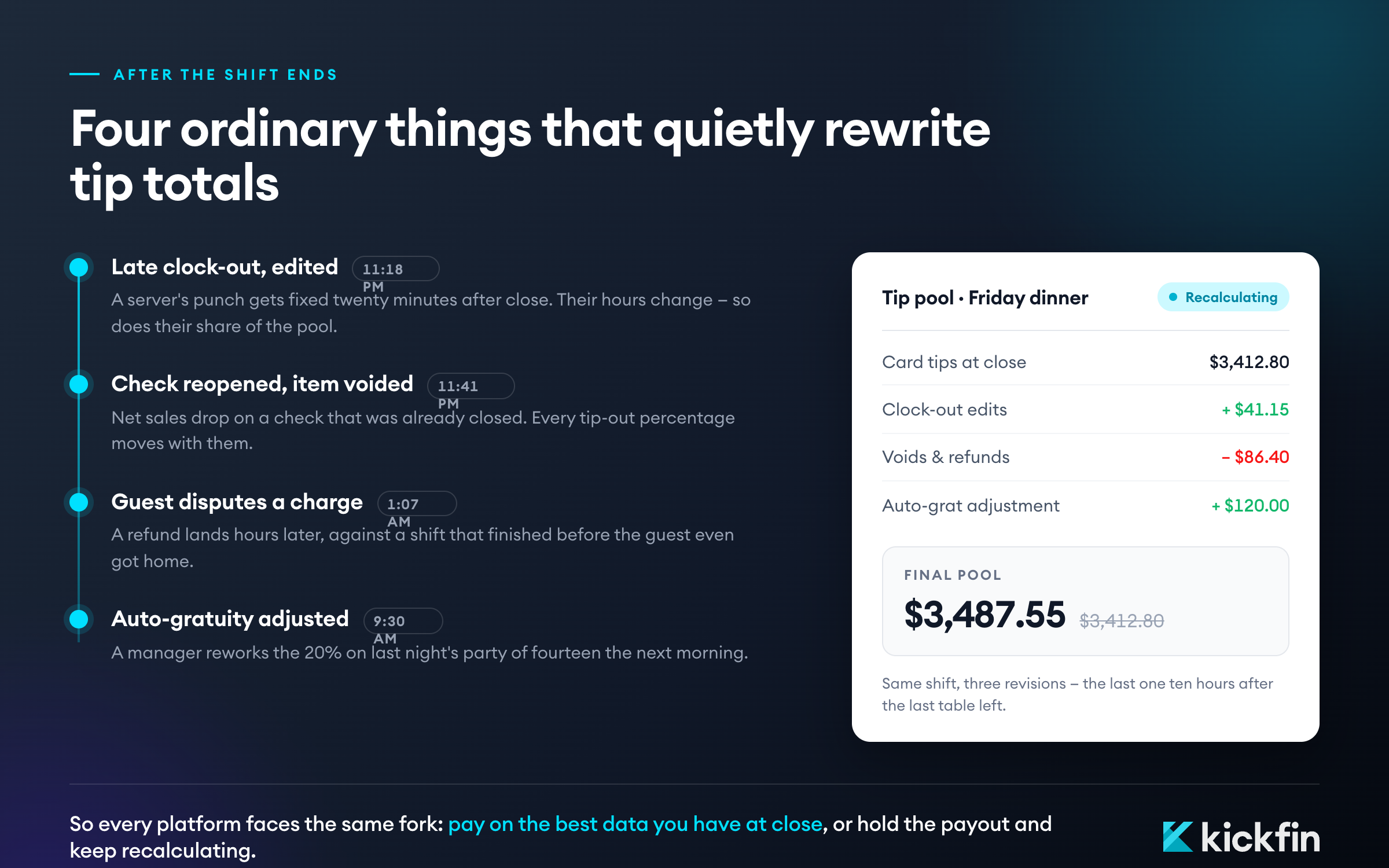
Restaurants are messy in motion. Clock-outs get edited after the fact. Checks get reopened. A guest disputes a charge two hours after they leave. An auto-gratuity gets adjusted for a large party. None of that is a flaw in your operation — it’s just how a busy service actually runs.
So every tip platform faces the same fork in the road: do you pay your team on the best data you have the moment the shift ends, or do you hold the payout and keep recalculating until the numbers are finalized? Neither is “wrong.” But they lead to two very different experiences for your staff and your managers — and that’s really what you’re choosing between.
How does TipHaus approach reconciliation?
Based on TipHaus’s own materials, their model keeps a pay period’s tips provisional and re-checks the POS on a schedule — they reference roughly every 15 minutes — recalculating on the latest labor and rules until a manager “finalizes” the period. If a discrepancy turns up after that, their system adjusts an upcoming payout to true it up rather than pulling money back.
It’s a calculation-accuracy loop, and on their own page it’s framed around getting the numbers right — not around getting money to your team faster. That’s worth noticing, because the two are connected more tightly than it first appears.
Why can TipHaus “adjust future payouts” — and what’s the trade-off?
Here’s the mechanic underneath the marketing: you can only adjust a payout that hasn’t gone out yet. TipHaus can shuffle amounts across payouts because, in their model, the money is still in the system — tips stay provisional until someone finalizes the period.
But that’s worth sitting with, because it quietly undercuts the entire point of tip automation. The reason you automate tip calculation is so the rules decide the split — objectively, the same way every time — and then your team gets paid. A model that keeps tips provisional until a manager finalizes never quite lets that happen. The rules don’t get the last word; a person’s finalize does. Until they click it, the number isn’t settled and can still move — through another recalculation or a manual change — between the shift your staff worked and the check they actually receive.
That’s the opposite of what automation is supposed to buy you. Instead of “the rules ran, so pay the team,” you get “the rules ran, but nothing’s final until a manager closes the period.” It keeps a human in the middle of a process that was supposed to run itself, and leaves the outcome open to change right up until it locks. For a team that counts on every dollar, tips that stay provisional aren’t reassuring — they’re a reason to ask whether the rules or the manager had the final say.
How does Kickfin handle reconciliation differently?
Kickfin is built the other way around: finalize and pay. You run a session, handle the real-world cases up front — splitting a check, adjusting labor, allocating cash tips to the right people — review the numbers, and submit. The moment you do, the money is in your team’s bank accounts through instant tip payouts. No waiting for a period to close.
You also get a complete, auditable record of every payout — by location, shift, and employee. And when POS data changes after the fact, Kickfin can re-run the day and surface exactly what changed, so you can see the difference and handle it deliberately — with a clear trail, not a silent adjustment buried in a future check.
So does Kickfin do “automated tip reconciliation”?
Kickfin reconciles — just differently. Because we pay your team the instant a shift’s session is submitted, we put our energy into getting the calculation right in real time, with the messy cases handled before you pay, and into giving you a transparent way to catch and review anything that changes afterward.
What we don’t do is keep your team’s money in a holding balance so it can be quietly auto-adjusted later — because your team is already paid. That’s the real trade every operator should weigh: continuous recalculation of money that hasn’t moved, versus instant payment with clear, reviewable reconciliation after the fact.
Which model is right for your restaurant?
Look past the feature names at what each model actually asks of the people who matter — your team and your managers.
A provisional-until-finalized system like TipHaus holds your team’s tips in a pending state — calculated and re-calculated on a loop — until a manager finalizes the period. The “automation” is the software re-checking its own numbers; a person still has to lock it. And once they do, that period is closed: any correction after that shows up as an adjustment on a future paycheck, not on the shift it belongs to. The only reason they can “adjust a future payout” at all is that your staff hasn’t been paid yet. That isn’t speed — it’s a holding pattern with your team’s money inside it.
Kickfin runs the opposite way. The math is done in a real-time session — splits, labor, and cash handled up front — and the moment you submit, your team is paid to the bank account they already have. If the data changes later, you re-run the day, see exactly what moved, and handle it in the open, with a full audit trail. Your people get paid now; nothing sits pending waiting for someone to close a period.
To be fair: if you’d genuinely prefer to hold every payout until you finalize, a provisional model can do that. But for most operators the deciding question is the one your closing server is already asking — when is my money actually in my bank: now, or after the period is finalized? That answer usually makes the choice for you.
See how Kickfin compares to TipHaus across the features that matter most to restaurant teams.